> ## Documentation Index
> Fetch the complete documentation index at: https://blaxel-feat-keep-alive-timeout-clarification.mintlify.site/llms.txt
> Use this file to discover all available pages before exploring further.
# Self-host Claude Managed Agents on Blaxel
> Self-host the Claude Managed Agents (CMA) sandbox execution layer on Blaxel while Anthropic runs the agent loop, with isolated tool execution.
Blaxel integrates with [Claude Managed Agents (CMA)](https://platform.claude.com/docs/en/managed-agents/overview), allowing you to self-host the sandbox layer while keeping the agent loop entirely within Anthropic's platform. Through this integration, every tool call the agent makes runs inside a Blaxel [sandbox](https://docs.blaxel.ai/Sandboxes/Overview), letting the agent execute commands, work with files and directories, write code, and perform computations in fully isolated environments.
This tutorial walks you through deploying a self-hosted CMA execution environment on Blaxel.
## Prerequisites
* A Python development environment with Docker installed.
* An Anthropic API key. If not, [sign up for an Anthropic account](https://platform.claude.com/) and obtain an API key.
* A Blaxel account and API key. If not, [sign up for a Blaxel account](https://blaxel.ai) and [obtain an API key](/Security/Access-tokens#api-keys).
* The Blaxel CLI. If not, [download and install the Blaxel CLI](../cli-reference/introduction).
* The Anthropic CLI (optional). If not, [download and install the Anthropic CLI](https://platform.claude.com/docs/en/api/sdks/cli).
## How it works
Under this approach, the agent loop is managed by Anthropic, while sandbox creation and tool execution happens on the Blaxel platform.
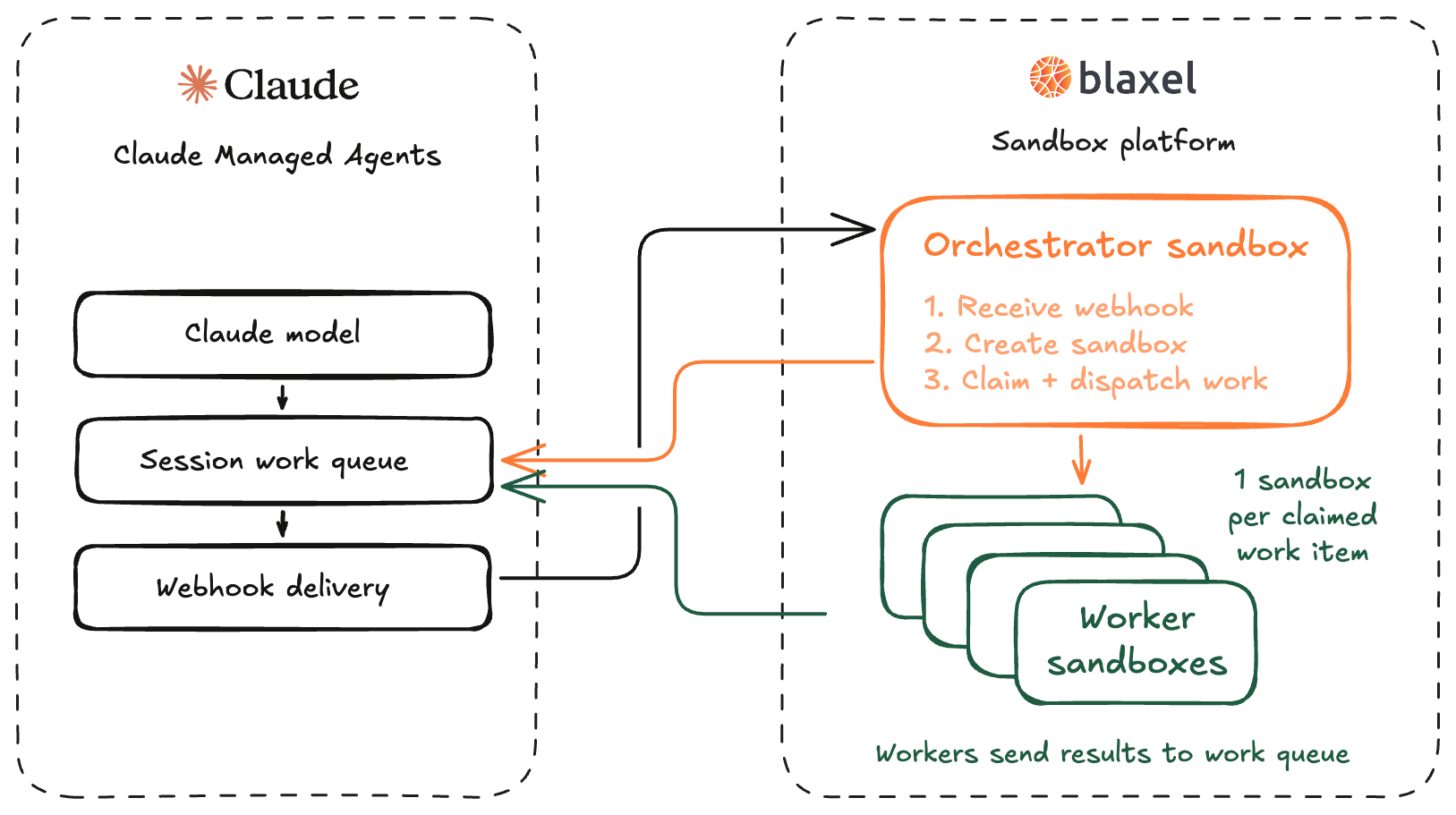
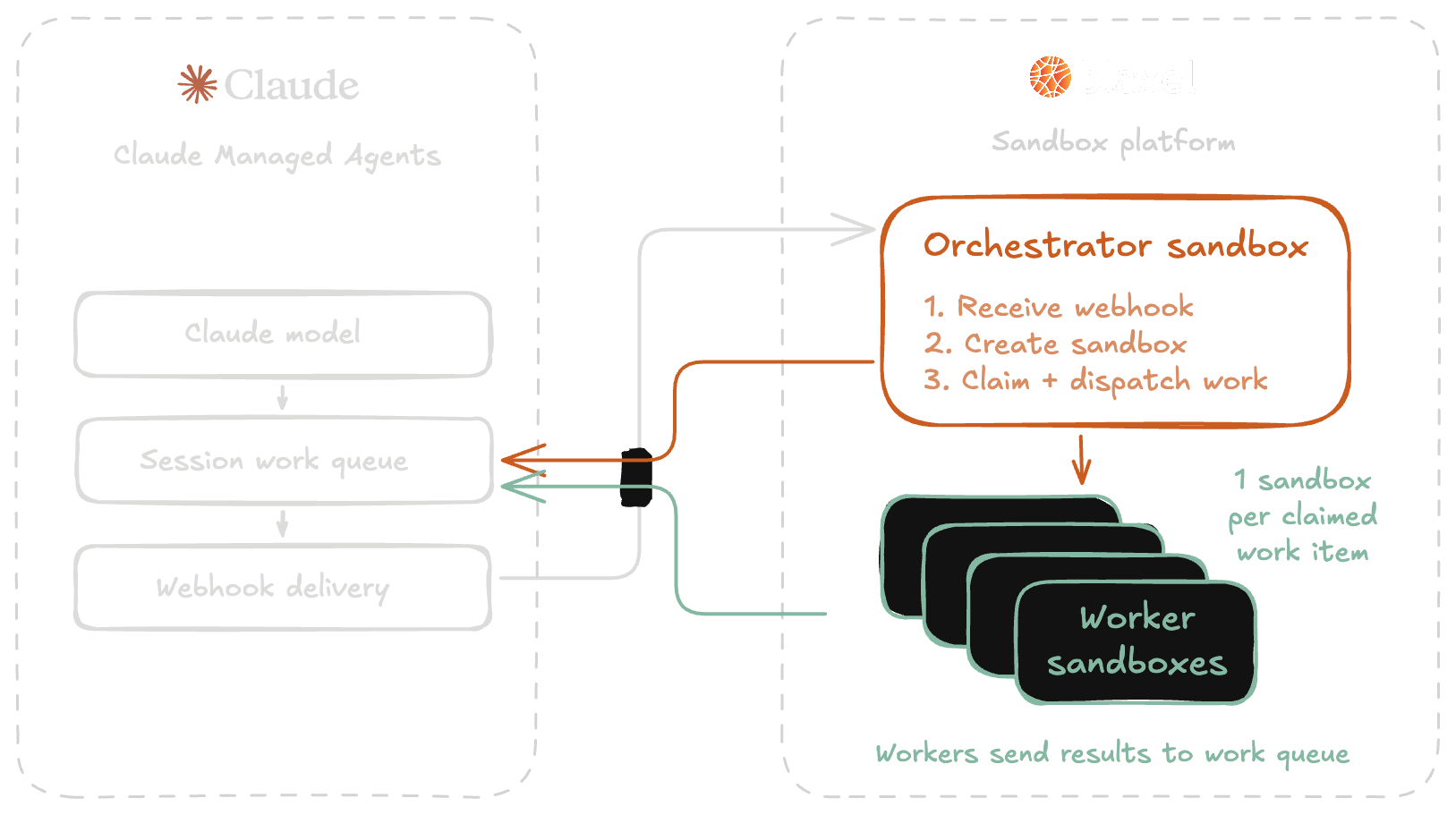 * When a session starts, Anthropic sends an event to an orchestrator sandbox running on Blaxel. The orchestrator sandbox exposes a public [preview URL](https://docs.blaxel.ai/Sandboxes/Preview-url) that is registered with Anthropic.
* The orchestrator receives events from Anthropic and spawns a worker sandbox for the session. The worker is a short-lived sandbox that exists to execute tool calls, perform file operations and execute code.
* The worker process exits shortly after the session goes idle, and Blaxel auto-deletes the worker sandbox when its TTL (measured from creation) expires. The orchestrator sandbox is a long-running sandbox which continues to exist to receive future events.
## 1. Clone the repository and log in to Blaxel
Clone the [sample repository](https://github.com/blaxel-ai/cma-blaxel-sandbox.git), which includes templates for the orchestrator sandbox, worker sandbox, and related scripts.
```bash theme={null}
git clone https://github.com/blaxel-ai/cma-blaxel-sandbox.git
cd cma-blaxel-sandbox
```
Create the necessary environment variables:
```bash theme={null}
python3 -m venv .venv
source .venv/bin/activate
python -m pip install -r requirements-dev.txt
export ANTHROPIC_API_KEY=
export BL_WORKSPACE=
export BL_API_KEY=
```
Log in to Blaxel:
```bash theme={null}
bl login
```
## 2. Create a self-hosted environment
Define an [Anthropic environment](https://platform.claude.com/docs/en/managed-agents/self-hosted-sandboxes) for the agent and generate an environment key to authenticate the worker sandbox with Anthropic's work queue.
* On the [Claude Platform](https://platform.claude.com/), navigate to **Managed Agents** > **Environments**.
* Click **Add environment**.
* Configure a new environment:
* Name: "Blaxel"
* Type: Self-hosted
* Once the environment is created, click **Generate environment key**.
* Copy and save the environment key for use in a later step.
Run the following command:
```bash theme={null}
ant beta:environments create \
--name "Blaxel" \
--config '{type: self_hosted}'
```
Note the `id` from the response for use in a later step. Then:
* Navigate to **Managed Agents** > **Environments** on the [Claude Platform](https://platform.claude.com/).
* Select the environment.
* Click **Generate environment key**.
* Copy and save the key for use in a later step.
You can list available environments with `ant beta:environments list --transform "{id,name}" --format jsonl`.
Use one self-hosted environment per Blaxel workspace. Every orchestrator connected to an environment competes for the same work queue, and whichever claims a work item first creates the worker sandbox in its own workspace. If another orchestrator in a different workspace is connected to the same environment, your sessions still complete, but the worker sandboxes appear in that other workspace.
## 3. Build and push the sandbox images
The template repository includes two sandbox images: a worker that runs agent tool calls, and an orchestrator that handles webhooks and spawns workers. The next step is to push these images to Blaxel.
Pushing an image to Blaxel packages your code and uploads it to Blaxel's registry so it can be provisioned as an on-demand sandbox during agent runs. See the [`bl push` reference](https://docs.blaxel.ai/cli-reference/commands/bl_push) for more details.
### Worker image
The worker image is based on `node:22-bookworm-slim` and contains multiple [pre-installed applications and tools](https://platform.claude.com/docs/en/managed-agents/cloud-sandboxes-reference). Push it from the `worker/` directory in the cookbook repo:
```bash theme={null}
( cd worker && bl push --type sandbox )
```
### Orchestrator image
The orchestrator runs a FastAPI server that exposes an endpoint to receive webhook events. Push it from the `orchestrator/` directory:
```bash theme={null}
( cd orchestrator && bl push --type sandbox )
```
Within the orchestrator is a FastAPI webhook server that runs inside a long-lived Blaxel sandbox. It listens for `session.status_run_started` events from Anthropic's CMA platform, verifies the webhook signature, and schedules a background dispatch task for the session. The webhook handler returns 200 immediately; sandbox creation happens in the background.
The main workhorse is `_dispatch_for_session`, which runs as a background task for each incoming session:
```python theme={null}
async def _dispatch_for_session(session_id: str) -> None:
try:
if dispatcher_debounce_ms > 0:
await asyncio.sleep(dispatcher_debounce_ms / 1000)
session_ids = set(_scheduled_session_ids)
session_ids.add(session_id)
session_ids.update(await _queued_work_session_ids())
prepared_workers = await _ready_workers_for_sessions(session_ids)
if session_id not in prepared_workers:
raise RuntimeError(f"worker {_worker_name(session_id)} never became ready")
ok = await _drain_and_dispatch_work(prepared_workers=prepared_workers)
if not ok:
logger.error("background dispatch for session %s had failures", session_id)
except Exception as exc:
logger.error("background dispatch for session %s failed before claim: %r", session_id, exc)
finally:
_scheduled_session_ids.discard(session_id)
```
This function performs the following tasks:
* It debounces briefly so that multiple near-simultaneous webhooks can be batched into a single dispatch cycle, ensuring the queue is efficiently polled.
* It collects all pending session IDs and pre-warms their sandboxes in parallel.
* It calls `_drain_and_dispatch_work`, which claims queued work items via the Anthropic SDK's `work.poller` and, for each item, calls `_dispatch_work_item`.
The `_dispatch_work_item` function is where a specific work item is actually handed off to its session sandbox. It runs `ant beta:worker run` as a process on the pre-readied sandbox, passing `ANTHROPIC_WORK_ID` and `ANTHROPIC_SESSION_ID` as environment variables so the worker binds to that work item:
```python theme={null}
await worker.process.exec({
"name": process_name,
"command": f"ant beta:worker run --workdir /workspace --max-idle {worker_max_idle}",
"wait_for_completion": False,
"keep_alive": True,
"timeout": worker_keepalive_timeout,
"env": process_env,
})
```
The process is started with `wait_for_completion=False` and `keep_alive=True` so the sandbox stays active while `ant run` serves the session. The `ant beta:worker run` command owns the heartbeat and stop logic for the claimed work item; the orchestrator does not heartbeat after handing off.
The `_ensure_worker_ready` function creates Blaxel worker sandboxes (or reuses one if it already exists for that session):
```python theme={null}
async def _ensure_worker_ready(session_id: str):
name = _worker_name(session_id)
spec = {
"name": name,
"image": worker_image,
"memory": 4096,
"ttl": worker_ttl,
}
if worker_region:
spec["region"] = worker_region
spec = await apply_worker_features(spec, session_id=session_id, region=worker_region)
worker = await SandboxInstance.create_if_not_exists(spec)
logger.info("worker %s readying for session %s", name, session_id)
if not await _wait_for_worker_ready(worker, name):
raise RuntimeError(f"worker {name} never became ready")
return worker
```
The sandbox `ttl` field defaults to `2h`, ensuring that Blaxel deletes the sandbox 2 hours after creation regardless of activity. This is a cleanup guarantee for cases where the orchestrator never issues an explicit delete. It should be configured (via `BLAXEL_WORKER_TTL`) to a value greater than the longest expected session length.
To give the agent access to third-party credentials, use [Blaxel Proxy secret injection](/Sandboxes/Proxy-secrets-injection). The proxy injects the credential into the worker's outbound requests, so the secret never enters the worker sandbox or the CMA agent config. The template supports this through the `BLAXEL_WORKER_PROXY_*` variables; see the [cookbook guide](https://github.com/blaxel-ai/cma-blaxel-sandbox/blob/main/GUIDE.md) for the recipe.
## 4. Deploy the orchestrator
Run `setup.py` from the repository to start the orchestrator sandbox and create a public preview URL:
```bash theme={null}
export ANTHROPIC_ENVIRONMENT_ID=
export ANTHROPIC_ENVIRONMENT_KEY=
python3 setup.py
```
`setup.py` prints the orchestrator's public preview URL (e.g. `https://.preview.bl.run/webhook`). Note this URL for the next step.
## 5. Configure the webhook
Register the orchestrator's preview URL in the Claude Platform so the platform notifies it when a new session starts.
* On the [Claude Platform](https://platform.claude.com/), navigate to **Manage** > **Webhooks**.
* Click **Add webhook endpoint**.
* Set the endpoint URL to the preview URL from the previous step and subscribe to the `session.status_run_started` event. This is the only event the orchestrator consumes.
* Once created, copy the generated signing key, then re-run `setup.py` with this value exported:
```bash theme={null}
export ANTHROPIC_WEBHOOK_SIGNING_KEY=
python3 setup.py
```
## 6. Create an agent
Create an agent configuration that defines the model and system prompt for each agent session.
* On the [Claude Platform](https://platform.claude.com/), navigate to **Managed Agents** > **Agents**.
* Click **New agent**.
* Click the **Template** tab and select **Blank agent**.
* In the **Agent config** section, update the following YAML keys:
* `name`: "Blaxel Assistant"
* `model`: "claude-sonnet-4-6"
* `system`: "You are a helpful assistant."
* Make sure the `tools` section includes `- type: agent_toolset_20260401`. This toolset provides the built-in file and bash tools the agent runs in the worker sandbox.
* Click **Create agent**.
```bash theme={null}
ant beta:agents create <<'YAML'
name: Blaxel Assistant
model: claude-sonnet-4-6
system: |
You are a helpful assistant
tools:
- type: agent_toolset_20260401
YAML
```
Note the `id` from the response, as you will need it to start a session.
You can list available agents with `ant beta:agents list --transform "{id,name,model}" --format jsonl`.
## 7. Start a session
With the environment and agent configured, start a session to run the agent.
* On the [Claude Platform](https://platform.claude.com/), navigate to **Managed Agents** > **Sessions**.
* Click **New session**.
* Select your agent and the Blaxel environment, then send an initial message.
Export the agent ID and run the example session from the repository:
```bash theme={null}
export ANTHROPIC_AGENT_ID=
python3 example/run_session.py
```
The script prints the session transcript, ends with `EXAMPLE: PASS`, and verifies the worker sandbox in your workspace before printing the `bl get sandbox` command that inspects it.
Alternatively, start a session using the agent ID and environment ID from the previous steps:
```bash theme={null}
ant beta:sessions create \
--agent \
--environment-id \
--title "Blaxel session"
```
Send an initial message using the session ID from the response:
```bash theme={null}
ant beta:sessions:events send \
--session-id \
--event '{type: user.message, content: [{type: text, text: "Your initial message here"}]}'
```
You can then interactively inspect the session messages:
```bash theme={null}
ant beta:sessions:events list \
--session-id \
--type user.message \
--type agent.message
```
When the session starts, the Claude Platform sends a `session.status_run_started` event to the orchestrator. The orchestrator schedules a background task that creates the worker sandbox, claims the work item from Anthropic's queue, and uses the sandbox to execute tool calls and post results back to Anthropic. The worker process exits when the session goes idle, and the sandbox is auto-deleted when its TTL expires.
The orchestrator sandbox and its public preview URL persist until you remove them. Delete the sandbox when done so the public webhook endpoint does not stay live:
```bash theme={null}
bl delete sandbox cma-orchestrator-app
```
## Resources
Want more info on developing and deploying agents on Blaxel? Check out the following resources:
Operate a remote Blaxel sandbox from your own self-hosted Claude Agent SDK (using MCP).
Deploy Claude Code CLI inside of a Blaxel sandbox.
Complete tutorial for building an agent with Claude Agent SDK and deploying it on Blaxel as a serverless auto-scalable API.
Complete tutorial for managing variables and secrets when deploying to Blaxel.
* When a session starts, Anthropic sends an event to an orchestrator sandbox running on Blaxel. The orchestrator sandbox exposes a public [preview URL](https://docs.blaxel.ai/Sandboxes/Preview-url) that is registered with Anthropic.
* The orchestrator receives events from Anthropic and spawns a worker sandbox for the session. The worker is a short-lived sandbox that exists to execute tool calls, perform file operations and execute code.
* The worker process exits shortly after the session goes idle, and Blaxel auto-deletes the worker sandbox when its TTL (measured from creation) expires. The orchestrator sandbox is a long-running sandbox which continues to exist to receive future events.
## 1. Clone the repository and log in to Blaxel
Clone the [sample repository](https://github.com/blaxel-ai/cma-blaxel-sandbox.git), which includes templates for the orchestrator sandbox, worker sandbox, and related scripts.
```bash theme={null}
git clone https://github.com/blaxel-ai/cma-blaxel-sandbox.git
cd cma-blaxel-sandbox
```
Create the necessary environment variables:
```bash theme={null}
python3 -m venv .venv
source .venv/bin/activate
python -m pip install -r requirements-dev.txt
export ANTHROPIC_API_KEY=
export BL_WORKSPACE=
export BL_API_KEY=
```
Log in to Blaxel:
```bash theme={null}
bl login
```
## 2. Create a self-hosted environment
Define an [Anthropic environment](https://platform.claude.com/docs/en/managed-agents/self-hosted-sandboxes) for the agent and generate an environment key to authenticate the worker sandbox with Anthropic's work queue.
* On the [Claude Platform](https://platform.claude.com/), navigate to **Managed Agents** > **Environments**.
* Click **Add environment**.
* Configure a new environment:
* Name: "Blaxel"
* Type: Self-hosted
* Once the environment is created, click **Generate environment key**.
* Copy and save the environment key for use in a later step.
Run the following command:
```bash theme={null}
ant beta:environments create \
--name "Blaxel" \
--config '{type: self_hosted}'
```
Note the `id` from the response for use in a later step. Then:
* Navigate to **Managed Agents** > **Environments** on the [Claude Platform](https://platform.claude.com/).
* Select the environment.
* Click **Generate environment key**.
* Copy and save the key for use in a later step.
You can list available environments with `ant beta:environments list --transform "{id,name}" --format jsonl`.
Use one self-hosted environment per Blaxel workspace. Every orchestrator connected to an environment competes for the same work queue, and whichever claims a work item first creates the worker sandbox in its own workspace. If another orchestrator in a different workspace is connected to the same environment, your sessions still complete, but the worker sandboxes appear in that other workspace.
## 3. Build and push the sandbox images
The template repository includes two sandbox images: a worker that runs agent tool calls, and an orchestrator that handles webhooks and spawns workers. The next step is to push these images to Blaxel.
Pushing an image to Blaxel packages your code and uploads it to Blaxel's registry so it can be provisioned as an on-demand sandbox during agent runs. See the [`bl push` reference](https://docs.blaxel.ai/cli-reference/commands/bl_push) for more details.
### Worker image
The worker image is based on `node:22-bookworm-slim` and contains multiple [pre-installed applications and tools](https://platform.claude.com/docs/en/managed-agents/cloud-sandboxes-reference). Push it from the `worker/` directory in the cookbook repo:
```bash theme={null}
( cd worker && bl push --type sandbox )
```
### Orchestrator image
The orchestrator runs a FastAPI server that exposes an endpoint to receive webhook events. Push it from the `orchestrator/` directory:
```bash theme={null}
( cd orchestrator && bl push --type sandbox )
```
Within the orchestrator is a FastAPI webhook server that runs inside a long-lived Blaxel sandbox. It listens for `session.status_run_started` events from Anthropic's CMA platform, verifies the webhook signature, and schedules a background dispatch task for the session. The webhook handler returns 200 immediately; sandbox creation happens in the background.
The main workhorse is `_dispatch_for_session`, which runs as a background task for each incoming session:
```python theme={null}
async def _dispatch_for_session(session_id: str) -> None:
try:
if dispatcher_debounce_ms > 0:
await asyncio.sleep(dispatcher_debounce_ms / 1000)
session_ids = set(_scheduled_session_ids)
session_ids.add(session_id)
session_ids.update(await _queued_work_session_ids())
prepared_workers = await _ready_workers_for_sessions(session_ids)
if session_id not in prepared_workers:
raise RuntimeError(f"worker {_worker_name(session_id)} never became ready")
ok = await _drain_and_dispatch_work(prepared_workers=prepared_workers)
if not ok:
logger.error("background dispatch for session %s had failures", session_id)
except Exception as exc:
logger.error("background dispatch for session %s failed before claim: %r", session_id, exc)
finally:
_scheduled_session_ids.discard(session_id)
```
This function performs the following tasks:
* It debounces briefly so that multiple near-simultaneous webhooks can be batched into a single dispatch cycle, ensuring the queue is efficiently polled.
* It collects all pending session IDs and pre-warms their sandboxes in parallel.
* It calls `_drain_and_dispatch_work`, which claims queued work items via the Anthropic SDK's `work.poller` and, for each item, calls `_dispatch_work_item`.
The `_dispatch_work_item` function is where a specific work item is actually handed off to its session sandbox. It runs `ant beta:worker run` as a process on the pre-readied sandbox, passing `ANTHROPIC_WORK_ID` and `ANTHROPIC_SESSION_ID` as environment variables so the worker binds to that work item:
```python theme={null}
await worker.process.exec({
"name": process_name,
"command": f"ant beta:worker run --workdir /workspace --max-idle {worker_max_idle}",
"wait_for_completion": False,
"keep_alive": True,
"timeout": worker_keepalive_timeout,
"env": process_env,
})
```
The process is started with `wait_for_completion=False` and `keep_alive=True` so the sandbox stays active while `ant run` serves the session. The `ant beta:worker run` command owns the heartbeat and stop logic for the claimed work item; the orchestrator does not heartbeat after handing off.
The `_ensure_worker_ready` function creates Blaxel worker sandboxes (or reuses one if it already exists for that session):
```python theme={null}
async def _ensure_worker_ready(session_id: str):
name = _worker_name(session_id)
spec = {
"name": name,
"image": worker_image,
"memory": 4096,
"ttl": worker_ttl,
}
if worker_region:
spec["region"] = worker_region
spec = await apply_worker_features(spec, session_id=session_id, region=worker_region)
worker = await SandboxInstance.create_if_not_exists(spec)
logger.info("worker %s readying for session %s", name, session_id)
if not await _wait_for_worker_ready(worker, name):
raise RuntimeError(f"worker {name} never became ready")
return worker
```
The sandbox `ttl` field defaults to `2h`, ensuring that Blaxel deletes the sandbox 2 hours after creation regardless of activity. This is a cleanup guarantee for cases where the orchestrator never issues an explicit delete. It should be configured (via `BLAXEL_WORKER_TTL`) to a value greater than the longest expected session length.
To give the agent access to third-party credentials, use [Blaxel Proxy secret injection](/Sandboxes/Proxy-secrets-injection). The proxy injects the credential into the worker's outbound requests, so the secret never enters the worker sandbox or the CMA agent config. The template supports this through the `BLAXEL_WORKER_PROXY_*` variables; see the [cookbook guide](https://github.com/blaxel-ai/cma-blaxel-sandbox/blob/main/GUIDE.md) for the recipe.
## 4. Deploy the orchestrator
Run `setup.py` from the repository to start the orchestrator sandbox and create a public preview URL:
```bash theme={null}
export ANTHROPIC_ENVIRONMENT_ID=
export ANTHROPIC_ENVIRONMENT_KEY=
python3 setup.py
```
`setup.py` prints the orchestrator's public preview URL (e.g. `https://.preview.bl.run/webhook`). Note this URL for the next step.
## 5. Configure the webhook
Register the orchestrator's preview URL in the Claude Platform so the platform notifies it when a new session starts.
* On the [Claude Platform](https://platform.claude.com/), navigate to **Manage** > **Webhooks**.
* Click **Add webhook endpoint**.
* Set the endpoint URL to the preview URL from the previous step and subscribe to the `session.status_run_started` event. This is the only event the orchestrator consumes.
* Once created, copy the generated signing key, then re-run `setup.py` with this value exported:
```bash theme={null}
export ANTHROPIC_WEBHOOK_SIGNING_KEY=
python3 setup.py
```
## 6. Create an agent
Create an agent configuration that defines the model and system prompt for each agent session.
* On the [Claude Platform](https://platform.claude.com/), navigate to **Managed Agents** > **Agents**.
* Click **New agent**.
* Click the **Template** tab and select **Blank agent**.
* In the **Agent config** section, update the following YAML keys:
* `name`: "Blaxel Assistant"
* `model`: "claude-sonnet-4-6"
* `system`: "You are a helpful assistant."
* Make sure the `tools` section includes `- type: agent_toolset_20260401`. This toolset provides the built-in file and bash tools the agent runs in the worker sandbox.
* Click **Create agent**.
```bash theme={null}
ant beta:agents create <<'YAML'
name: Blaxel Assistant
model: claude-sonnet-4-6
system: |
You are a helpful assistant
tools:
- type: agent_toolset_20260401
YAML
```
Note the `id` from the response, as you will need it to start a session.
You can list available agents with `ant beta:agents list --transform "{id,name,model}" --format jsonl`.
## 7. Start a session
With the environment and agent configured, start a session to run the agent.
* On the [Claude Platform](https://platform.claude.com/), navigate to **Managed Agents** > **Sessions**.
* Click **New session**.
* Select your agent and the Blaxel environment, then send an initial message.
Export the agent ID and run the example session from the repository:
```bash theme={null}
export ANTHROPIC_AGENT_ID=
python3 example/run_session.py
```
The script prints the session transcript, ends with `EXAMPLE: PASS`, and verifies the worker sandbox in your workspace before printing the `bl get sandbox` command that inspects it.
Alternatively, start a session using the agent ID and environment ID from the previous steps:
```bash theme={null}
ant beta:sessions create \
--agent \
--environment-id \
--title "Blaxel session"
```
Send an initial message using the session ID from the response:
```bash theme={null}
ant beta:sessions:events send \
--session-id \
--event '{type: user.message, content: [{type: text, text: "Your initial message here"}]}'
```
You can then interactively inspect the session messages:
```bash theme={null}
ant beta:sessions:events list \
--session-id \
--type user.message \
--type agent.message
```
When the session starts, the Claude Platform sends a `session.status_run_started` event to the orchestrator. The orchestrator schedules a background task that creates the worker sandbox, claims the work item from Anthropic's queue, and uses the sandbox to execute tool calls and post results back to Anthropic. The worker process exits when the session goes idle, and the sandbox is auto-deleted when its TTL expires.
The orchestrator sandbox and its public preview URL persist until you remove them. Delete the sandbox when done so the public webhook endpoint does not stay live:
```bash theme={null}
bl delete sandbox cma-orchestrator-app
```
## Resources
Want more info on developing and deploying agents on Blaxel? Check out the following resources:
Operate a remote Blaxel sandbox from your own self-hosted Claude Agent SDK (using MCP).
Deploy Claude Code CLI inside of a Blaxel sandbox.
Complete tutorial for building an agent with Claude Agent SDK and deploying it on Blaxel as a serverless auto-scalable API.
Complete tutorial for managing variables and secrets when deploying to Blaxel.